
Your events
How events look to a sales rep: the list, being on an event's team, adding a lead from an event, and the stand's board.
Admins set events up. See Events. Here is what you see as a rep.
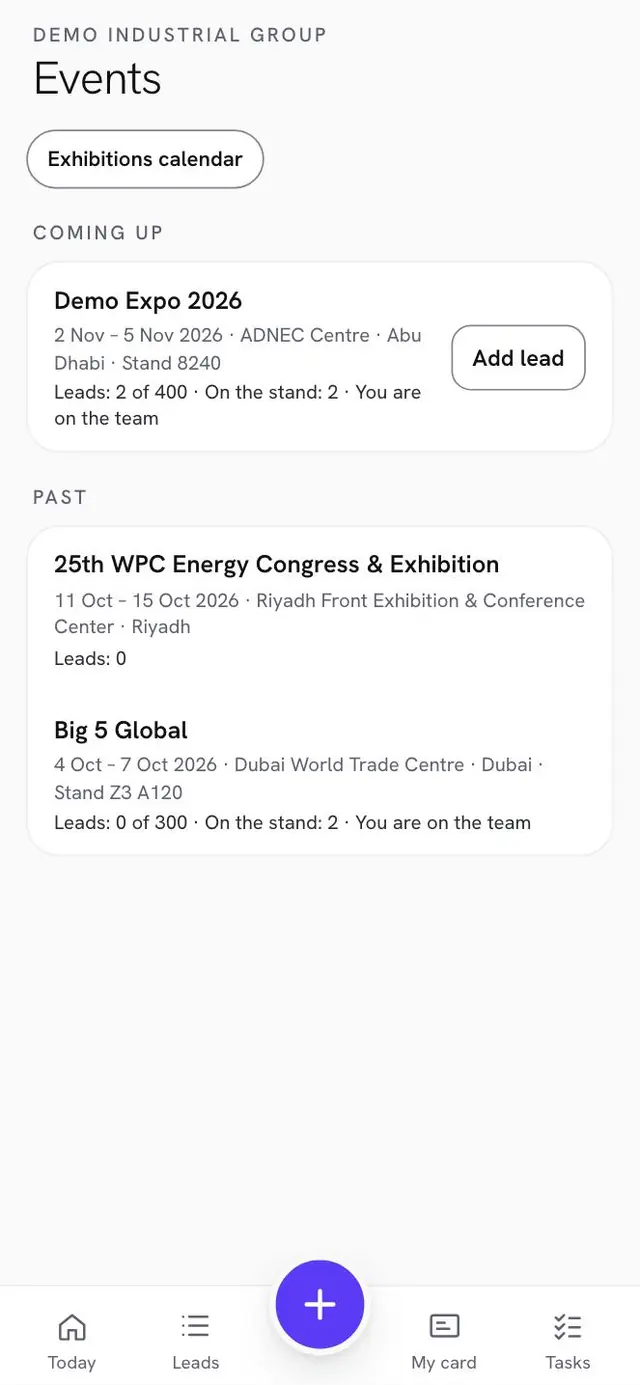
See your events
Open Profile, then Events. On a computer it is in the menu. Events are listed under On now, Coming up and Past.
Each one shows its dates, venue, city and stand, how many leads it has against its target, how many people are on the stand, and You are on the team if you are.
- Add lead opens the lead form with that event chosen. It is there for events that are not over.
- Exhibitions calendar also lists every exhibition your company has on its calendar. These are marked Calendar.
When you are on an event’s team
- That event is offered first when you capture a lead.
- While it is running, Today shows The stand’s board.
- If your admin has set where the stand is, a day you start clearly somewhere else is marked for your manager. See Check in and out.
An event that is not listed
Type its name when choosing the event. You can find any event on your company’s calendar this way. Only an admin can add a new one. If it is missing, save with No event and tell your manager.
In a personal space you add your own: type the name and choose Add when it is offered.
The stand’s board
Tap The stand’s board on Today. It updates by itself every 30 seconds.
| Part | What it shows |
|---|---|
| Leads today | The whole stand, today |
| Leads in all | The whole stand, against the target if there is one |
| Team goal: follow up by morning | If goals are on: the share followed up by the next working morning, and how many are still due |
| Your leads | Your own count. A rep does not see a list of everyone’s |
| Latest | The newest captures: who made them, and how warm |
Tap a line under Latest to open a lead you are allowed to see. A colleague’s lead shows who captured it and how warm it is.
Still stuck?
Ask your company's admin, or write to hello@lucidarc.ae. Say which screen you were on and what you expected to happen.