
Add people and teams
Invite your people, choose their level and team, and send the invitation again if the first one was lost.
Open Profile, then Organisation and roles. On a laptop it is under Settings in the side menu.
If your companies, branches and teams are not there yet, add them first. See Companies, branches and teams.
Invite a person
- Tap Invite people. To start with a team already chosen, open the team and tap Add member.
- Fill in the form below.
- Tap Send invitation.
They get an email and sign in with that address and a code sent to it. There is no password.
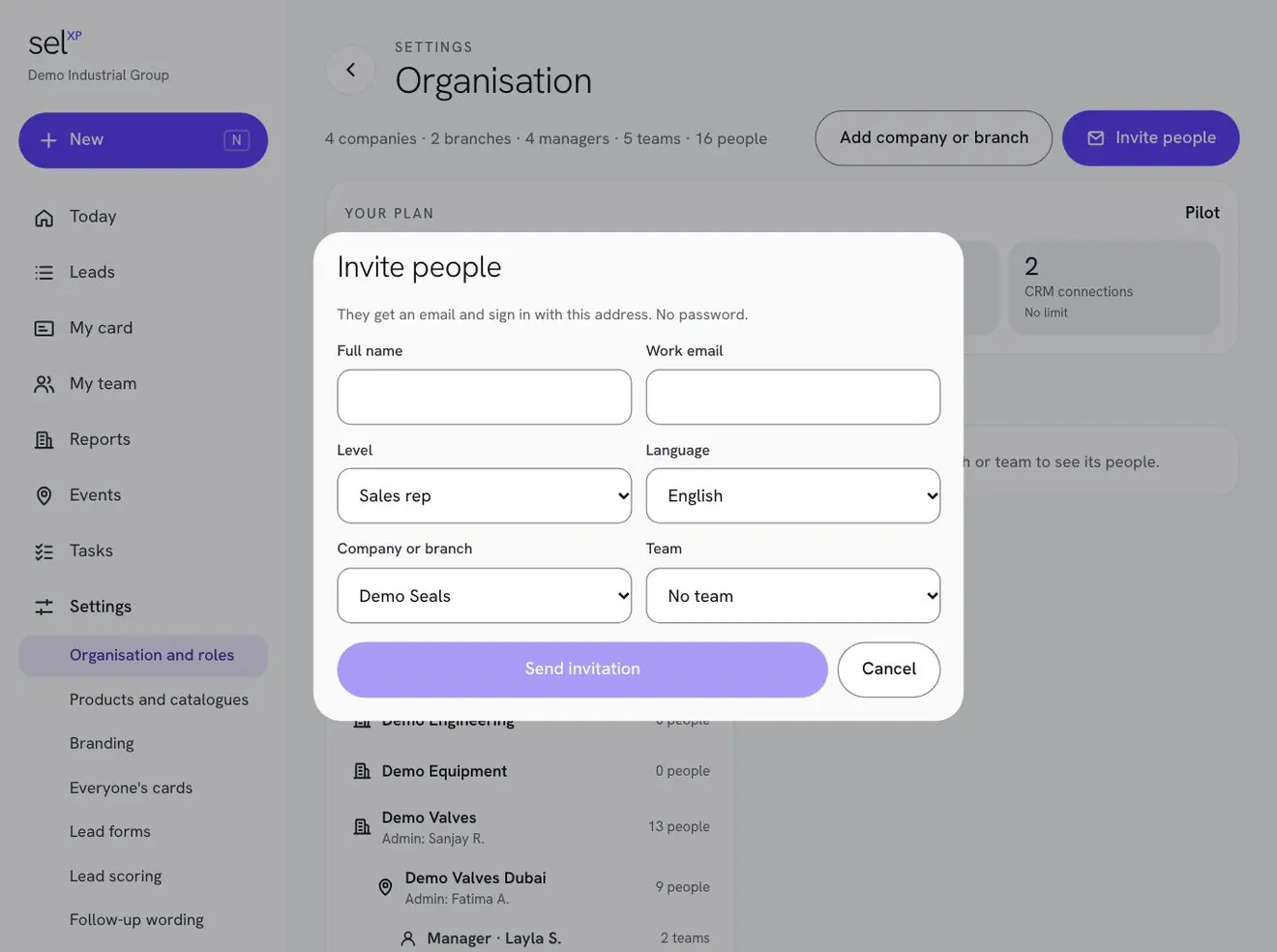
| Field | What it does |
|---|---|
| Full name | The name shown on their card, leads and reports. |
| Work email | The address they sign in with. |
| Level | Sales rep, Sales manager, Admin or Super admin. Only a super admin sees Super admin. See Who can do what. |
| Language | English or Arabic, for the emails they get from the app. |
| Company or branch | Where they belong. A super admin belongs to the whole group, so this is not asked. |
| Team | Shown for sales reps and sales managers. No team is allowed, but no manager then sees their leads. |
Change a person
Open a company, branch or team, then tap Edit beside the person. You can change these:
- Full name, Language and Level.
- Work email. This changes where their sign-in codes go. Someone who has not signed in yet is sent a fresh invitation.
- Team. See Move or switch off a person.
- Switch off. See the same page.
Tap Save.
What each status means
| Status | Meaning |
|---|---|
| Invited | They have not signed in yet. Send the invitation again is on their Edit form. |
| Active | They have signed in. |
| Switched off | They cannot sign in. Their leads stay. |
Each row shows
A person’s row shows their level, their Open leads, their status, and any other team they are also in.
Troubleshooting
- “That person is already here”. The email address is already in the workspace. The form says where they are. A super admin can add them to the chosen team as well. See Someone in two teams.
- “That person is already here but switched off”. Open them and switch them back on instead.
- “Your plan’s seats are all in use”. Switch someone off, or ask us for more. See Your plan.
- The invitation did not arrive. Check the address on the Edit form, ask them to look in junk mail, and use Send the invitation again. They can also go straight to the sign-in page and ask for a code.
Good to know
- A person has one home team and can also be added to others.
- A person with no team appears under Worth a look in Whole organisation.
- Every change here is recorded.
Still stuck?
Ask your company's admin, or write to hello@lucidarc.ae. Say which screen you were on and what you expected to happen.