
Your digital card
Give your details without a paper card: show your QR code, share a link, and get the other person's details back as a lead.
Use your digital card when you run out of paper cards, or instead of them. Before an exhibition, open My card and check your job title and phone number are there.
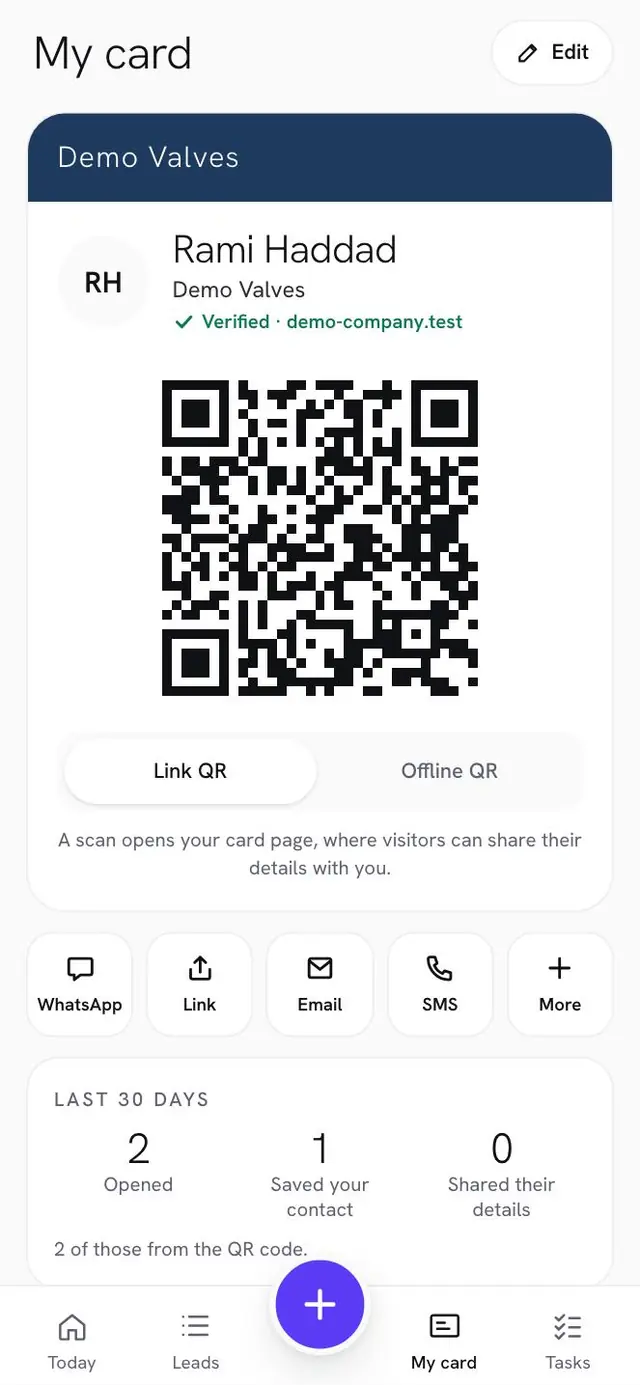
Share it
- Open My card.
- Let them scan the QR code with their phone’s camera. Or use one of the buttons under it.
| Button | What it does |
|---|---|
| Opens WhatsApp with your card’s link, for you to choose who gets it | |
| Link | Copies the link |
| Email, SMS | Opens a message with the link |
| More | Your phone’s own share menu |
Two kinds of QR code
| QR | What a scan does | When to use it |
|---|---|---|
| Link QR | Opens your card page, where they can share their details back | Whenever they have internet |
| Offline QR | Saves your contact straight to their phone. No internet needed | In a hall with no signal |
With no signal, the app switches to the Offline QR by itself and marks it auto. You can also choose either one yourself.
What they see
Your card page needs no app or sign-in. It shows your name, job title, company and logo, with any line you added, and has a button for Arabic or English. A mark shows if your company’s email domain is verified.
They can:
- Tap Save contact.
- Call, WhatsApp or Email you.
- Open your company’s catalogues, if there are any.
- Share their own details: name, company, work email and mobile if they like. They tick that your company may contact them, and can also ask for product news.
Their details arrive straight away as a lead for you, marked Shared their details.
Change your details
Tap Edit at the top. Your name, company and logo are set by your admin. You can change:
| Field | What it is |
|---|---|
| Job title | Also in Arabic, if you like |
| Mobile | Your phone number |
| A line about what you do | For example “Instrumentation valves and fittings”. Also in Arabic |
| Company, or what you do | In a personal space only. It shows under your name |
Changing your card needs a signal.
See how it is doing
Last 30 days shows how many people Opened your card, Saved your contact and Shared their details, and how many opens came from the QR code. It needs a signal.
More than one company
Add a card for another company is for selling for more than one company in your group. Pick the company. Details shared from that card become leads for that company. Tap the chips at the top to move between your cards.
Next
Still stuck?
Ask your company's admin, or write to hello@lucidarc.ae. Say which screen you were on and what you expected to happen.