
My report
Your own numbers: leads, hot and warm, follow-ups, pipeline and next steps, for any event and days, ready to save as a PDF.
Your report covers your own leads only. Open Profile, then My report. On a computer, it is Reports in the menu. Managers have a fuller report. See Reports.
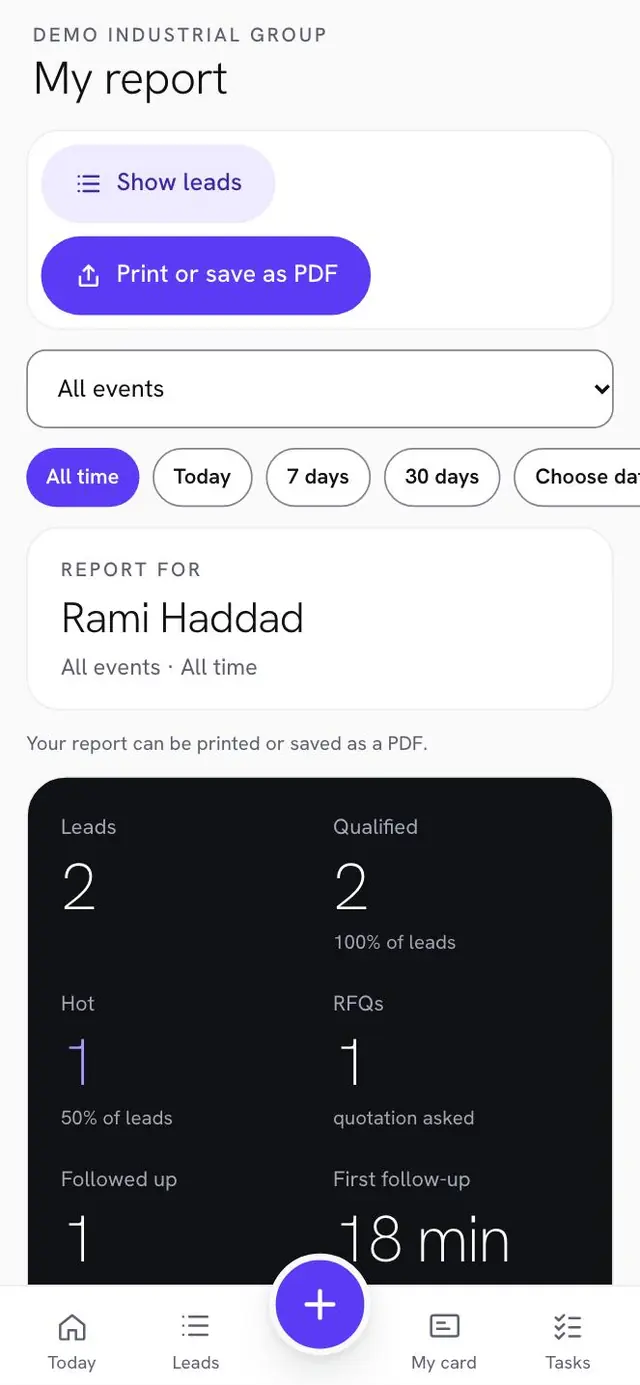
Choose what it covers
- Choose an event, or All events.
- Choose the days: All time, Today, 7 days, 30 days or Choose dates.
The Report for box says what the report covers. If you work for more than one company, you can narrow it to one.
What it shows
| Part | What it tells you |
|---|---|
| Leads, Qualified, Hot, RFQs, Followed up | Your counts. Against a target if the event has one |
| First follow-up | The middle time from capture to first contact |
| Pipeline | The value of your leads. Currencies are kept apart, never added together |
| Follow-ups done on time | Tasks done on time, and how many are overdue |
| Quality mix | Your split of hot, warm and cold |
| What they asked about | Your most asked-for products |
| Follow-up activity | Calls, emails, WhatsApp, meetings and visits, notes, and how many opened their page |
| Next steps | Planned, past due and none set. Open leads with no next step need one |
| By event | Shown when you choose all events |
| How they were met | Shown when there is more than one way |
List your leads
Tap Show leads to list them by name, with event, temperature, value, follow-up, next step and date. Tap it again to hide the list.
Save it
Tap Print or save as PDF, then choose to save as PDF in your phone’s print screen. The file is named after you, the event and the days. A saved report is always light.
A rep’s report can be printed, not exported as a spreadsheet. To get your leads as a spreadsheet, use Export on Leads.
The report needs a signal.
Still stuck?
Ask your company's admin, or write to hello@lucidarc.ae. Say which screen you were on and what you expected to happen.