
Pipeline and CRM

A pipeline and CRM that live on your phone

selXP keeps the deal in the app that met the customer. Every lead has a stage, a value and a next step, and behind the leads sit your contacts and companies with their full history. It is a light CRM: enough to run sales from a phone, and it can sit in front of a bigger CRM if your company already runs one.

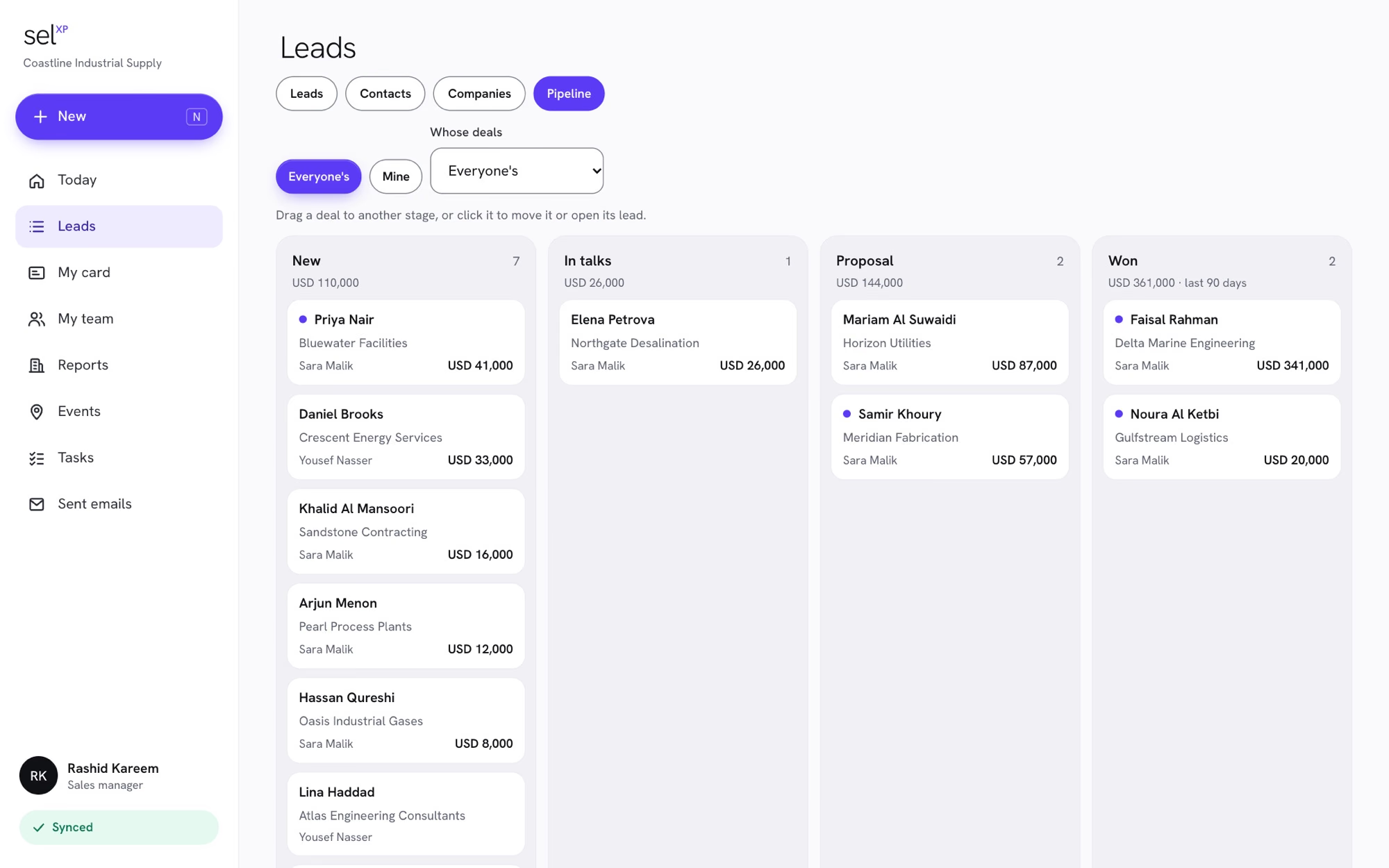
The pipeline board on a computer: leads in New, In talks, Proposal and Won, each with its value

What it does

What you get

  • Stages you name

    A pipeline starts as New, In talks, Proposal, Won and Lost. Rename the open stages to match the way you sell. Won and Lost keep their names.

  • The value of each stage

    See how many leads sit at each stage and what they are worth, with each currency kept apart.

  • Contacts and companies

    Everyone you have met and every company they work for, each with the leads, messages, visits and tasks behind them.

  • Sequences that follow up for you

    Emails and reminders that go out by themselves on the days you set, and stop as soon as the person is in touch.

  • Park a lead until the right day

    A buyer who says to call in March comes off Today and the reminders until then, and returns with a task on the day.

  • Deals won, on show

    Mark a deal won, with what it was worth if you wish. Your wins add up by month, quarter and year, and a company can share them with everyone, without the amounts.

  • A lead form for your website

    Paste one piece of code into your site or share the form's link. Each enquiry arrives as a lead with an owner, who is told by email and on their phone.

  • Bring your sheet with you

    Import the spreadsheet you already keep. Columns are matched to stages, hot, warm and cold, owners and products before anything is saved.

How it works

Step by step

There is nothing to set up before the first lead. The pipeline is there from the start.

  1. 01

    A lead comes in

    From a card, a QR code, your website form, an import or typed in. It starts at New.

  2. 02

    Follow up

    Send the first email or WhatsApp, or start a sequence that carries on by itself.

  3. 03

    Move the stage

    Tap the stage on the lead as the deal moves: In talks, Proposal, or your own names.

  4. 04

    Set the next step

    Every open lead holds a next step with a date, so Today always shows who is waiting.

  5. 05

    Mark it won

    Say what it was worth if you wish. It is counted in your wins and your team's.

In detail

The parts people ask about

Follow-up that keeps going

The first message goes out while the meeting is fresh. A sequence then sends the next emails and sets the reminders on the days you chose. It stops when the lead is closed, when the person asks not to be contacted, or when the lead changes hands.

  • One sequence is ready to use, and a super admin can make your own
  • Started from the lead's page by its owner
  • Delivered, bounced and opened are shown on the lead

A manager sees the same pipeline, by team

Pipeline by stage and deals won appear in Reports for a branch, a team or one person, beside leads, hot leads and how fast each one got its first message.

Good to know

What it does not do yet, said plainly

  • selXP is a light CRM. It does not do invoicing, stock, marketing automation or a help desk. If you need those, keep your main CRM and let selXP feed it.
  • Opened tracking for email is switched on by each workspace, and is off until then.
  • In selXP Solo, sequences, the website form and opened tracking are part of Solo Pro.
  • The website form does not yet record which campaign or advert an enquiry came from.

Questions

Pipeline and CRM: what people ask

Is selXP a CRM?

Yes, a light one. selXP keeps contacts and companies, a pipeline with stages and values, tasks, follow-up sequences and deals won, and it is built for the phone. It is not a full business system: it has no invoicing, stock or help desk.

Can I use it with the CRM my company already has?

Yes. selXP can sit in front of your CRM: leads are captured and followed up in selXP and sent on with their company, contact, history and next task. Odoo is the first connector and Zoho CRM is next. Any CRM can take the spreadsheet export.

Can I change the pipeline stages?

You can rename the open stages to match how you sell. Won and Lost keep their names, so reports mean the same thing in every team.

Can I import my existing contacts and deals?

Yes. Import a spreadsheet and match its columns to names, companies, stages, hot, warm and cold, owners and products. Rows that cannot be imported are listed before anything is saved.

How do leads from my website get in?

Make the website form in selXP, then paste its code into a page of your site or share its link. Each enquiry becomes a lead and goes to one person, to a team in turn, or waits for a manager to hand on.

See it with your team

See it set up around your products and your team.

Tell us how your team sells: on customer sites, on the road or at exhibitions. We will show you the app with your products, your team structure and your CRM in mind.

  1. What happens next
  2. Day 0You send the form. We reply within one working day.
  3. 30 minA call on your screen: capture, follow-up, CRM and what your managers see.
  4. Set-upWe build your workspace with you: companies, teams, products, wording.
Book a demo