
Your first week as an admin
A checklist for setting up your workspace in the right order, from the organisation chart to your first test lead.
Setup is easiest on a laptop. Work through this list once, in this order. Each step links to a page with the detail.
Find the settings
- On a laptop, Settings is in the side menu.
- On a phone, tap your initials at the top of Today to open Profile. The settings are in the list there, under Help and quick starts.
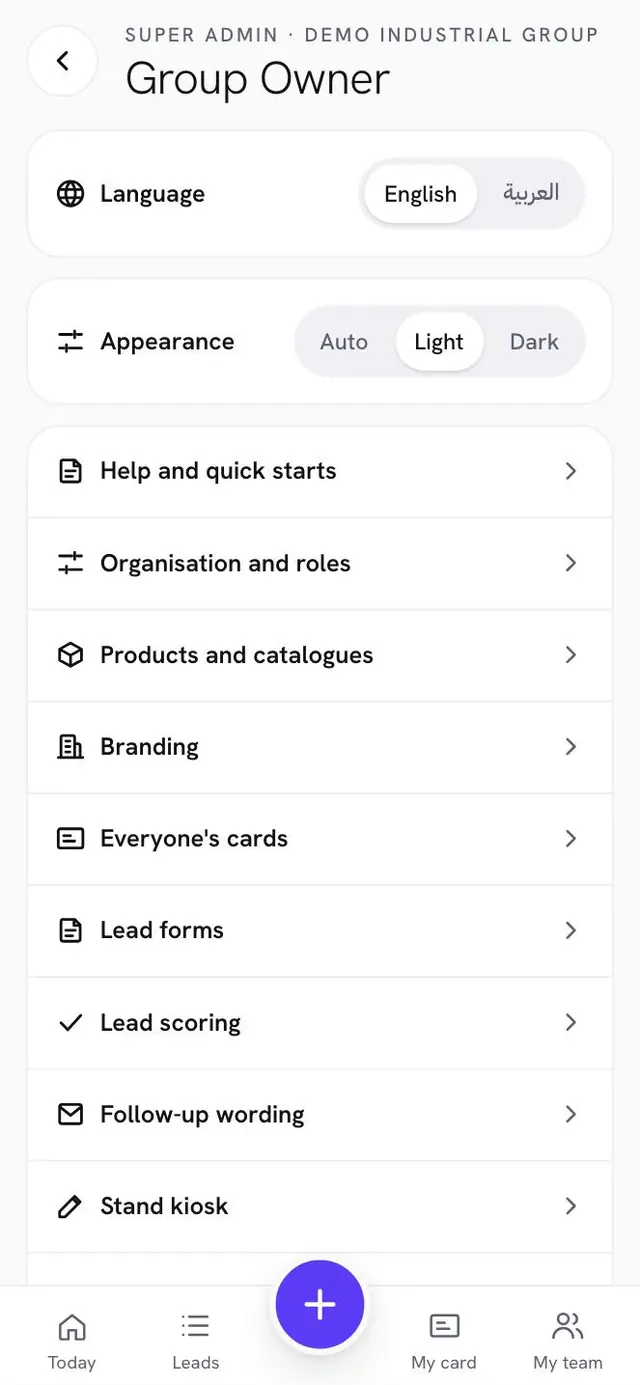
What you see depends on your level. A super admin sees every setting. An admin of a company or branch sees fewer. See Who can do what.
The checklist
- Check the organisation. Open Organisation and roles. Look at each company, branch, team and manager. Correct any name or email. See Companies, branches and teams.
- Add your branding. Give each company a logo and a colour. Add the link to your privacy notice. See Branding.
- Add products and catalogues. Reps tap products on a lead, and the catalogues go out with the follow-up. See Products and catalogues.
- Check the working calendar. Set your working days, Ramadan and holidays. Reminders and goals count working days. See Working calendar, goals and ranking.
- Set up your next event. Add the stand number and targets, and put the stand team on it. See Set up an event.
- Decide what reps are asked. The standard questions work from day one. Add a form if you want your own. See Lead forms.
- Read the follow-up wording. The standard messages are ready. Change them to your own words if you wish. See Follow-up wording.
- Choose reminders and summaries. The manager summaries are off until you turn them on. See Reminders and summaries.
- Make everyone’s cards. See Everyone’s cards.
- Invite your people. See Add people and teams.
- Try it yourself. Scan a card, follow it up and, if you use Field Presence, check in and out. You will then know what your team sees.
Good to know
- Have at least two super admins, so one person’s holiday does not lock the settings.
- Change the lead scoring after your first event, once you can see which leads turned into business. See Lead scoring.
- Connect your CRM when your leads are flowing. See CRM sync.
Still stuck?
Ask your company's admin, or write to hello@lucidarc.ae. Say which screen you were on and what you expected to happen.