
Team tasks
See your people's open tasks, give a task to someone, and move a task from one person to another.
Your own tasks work as they do for a rep: see Tasks and reminders. This page covers what is added for managers.
See your team’s tasks
- Open Tasks. On a phone, open My team and tap Your team’s open tasks, or tap All tasks on Today for your own.
- Switch from Mine to My team’s.
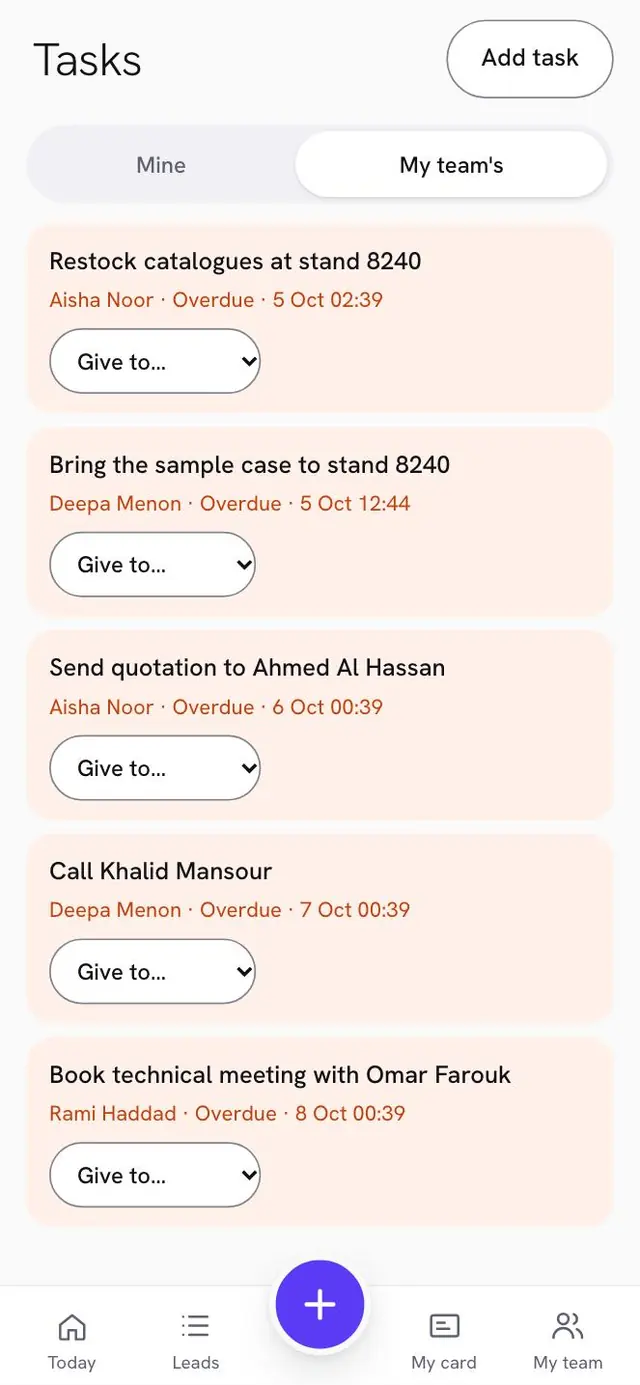
Each task shows the owner, Overdue if it is late, and its due date and time. If the task belongs to a lead, tap the title to open the lead. This view needs a connection. It shows open tasks only.
The tick for marking a task done is on the owner’s own list, not here.
Remarks
When someone taps Not done yet on a task, they write a remark and choose a new date. The latest remark shows on the task under My team’s, and the date is the new one. On a task about a lead, it is also in the lead’s history. See Tasks and reminders.
Give someone a task
- Tap Add task.
- Fill in the form.
- Tap Add task at the bottom.
| Box | What to enter |
|---|---|
| What needs doing? | The task, in a few words. You must fill this in. |
| Next step | The kind of task: Call, Email, WhatsApp, Send catalogue, Send quotation, Technical meeting, Site visit or Other. |
| Due | The day and time. Leave it empty if there is no date. |
| For | Me, or one of your people. |
They are told by email, and on their phone if reminders are on. They are reminded again when it is due.
Move a task
- Find the task under My team’s.
- Open Give to… and pick someone. Me takes the task yourself.
The task moves on that choice. A note says who has it, and they get an email unless you took it yourself.
When you hand a lead over, its open tasks go with it, so you do not need to move them one by one.
Good to know
- You can give tasks only to the people below you.
- People who no longer have access are not offered.
- “Your team has no open tasks” means there is nothing to chase.
Still stuck?
Ask your company's admin, or write to hello@lucidarc.ae. Say which screen you were on and what you expected to happen.